
Are you worried that your web page does not look as much as alive as it is supposed to be? Don’t worry; you are in the right place. We can help you make your website more interactive and look beautiful.
However, it’s okay if you are not a web developer. If you do not have any prior experience in the programming language, No worries!! This ultimate guide to learn JavaScript is also for you too. We warmly welcome you here.
In this article, we will cover everything that you must know about JavaScript. You will learn from scratch.
As it is the ultimate guide for beginners like you to learn JS, first, we will introduce you to what JavaScript is?
Intro to JavaScript?
JavaScript A.K.A JS is the most popular client-side scripting language. It was designed to make your webpage dynamic and more lively.
It is an open-source programming language supported by all browsers.
It was founded and designed by Brendan Eich. The goal was to expand web pages and implement animations to make web pages more attractive and alive.
JavaScript is a must for front-end web developers. It is versatile and beginner-friendly.
Why learn JavaScript?
Many developers prefer and suggest JavaScript because it has the following benefits :
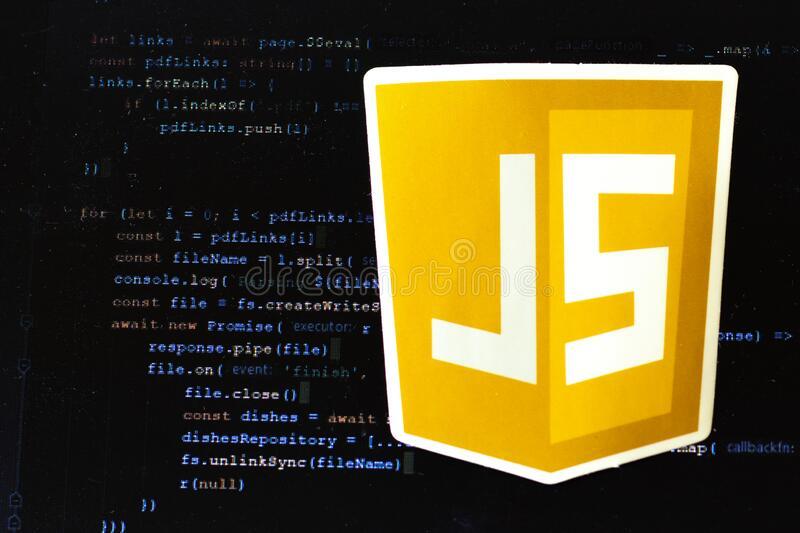
See the picture? How does JavaScript add functionality to your web page? It’s cool!
There are many more benefits; It does not end here.
Let us learn about some of the JavaScript basics.
JavaScript Basics :
1. Where to put :
- You can put inside a <script> tag within your HTML file in the <head> or <body> section.
- Usually, JavaScript code goes inside the <head> section; if you want to use it inside the <body>, we will ask you not to use it because your HTML code and JavaScript code will get mixed up.
- You can put your JavaScript file in a separate folder and later reference it with your HTML document.
For example, to use an external script tag use a src(source) attribute in s <script> tag.
<head>
<script src= “JS/javaScript.js”> </script>
</head>
2. JavaScript Comment :
Javascript comment statement does not execute.
Code after double slashes // or between /* and */ as comments.
Comments help others to understand your code.
3. Variables :
In a programming language, we store data values inside a variable.
JavaScript uses the “var” keyword to declare a variable. You can also use the “let” keyword.
To assign value to variables, you should use an equal sign in between.
For example,
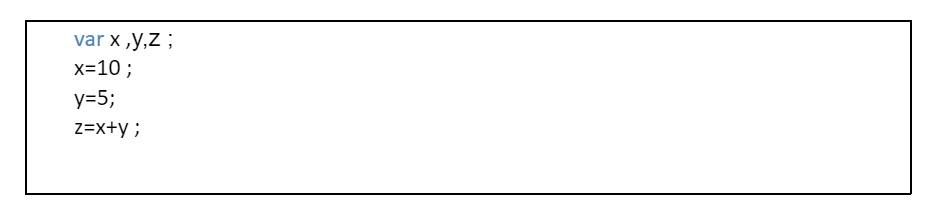
Here, x, y and z are called an identifier.
4. Data Types :
There are different data types in J.S.; you can assign string or numbers to a variable. These are called data types.
The data types are :
- Numbers
- String
- Boolean
- Undefined
- Null
For example,

Here, JavaScript will consider the number as a string.
5. Arrays :
JavaScript arrays can store multiple values in a single variable and keep it.
The process to store a single value in a single variable is time-consuming. We also use arrays to keep a list of items in a single variable name.
Syntax :

You can access the item by referring to the number of indexes. The indexing starts from zero.
Index zero is the first element; index one is the second element, and so on.
For example,

When you want to print the content in your html file, you will use document.write().
It will show you the first name “Alexa” from the variable name.
You can also add, delete and change the array element by referring to the index number.
6. Functions:
A JavaScript function is a block of reusable code that performs a particular task.
The function is executed whenever you “invoke” it.
JavaScript uses the “function” keyword, which is followed by its name and parentheses. You will write your code inside curly brackets.
For example,

The code inside the function executes whenever you invoke it or when an event occurs.
7. Conditionals :
the two types of conditionals in J.S. are
- If/ else
- Else if
If and else if statement executes a block of code when specified conditions are valid and execute another block of code if the condition is false.
Syntax :
- If (condition ) {
// code to be executed if the condition is true }
Else {
// code to be executed if the condition if false }

- If (condition 1) {
// code to be executed if the condition1 is true }
Else if (condition 2){
// execute code if the condition 1 is false and condition 2 is true }
Else {
//execute this code when both condition1 and condition 2 are false}

You can practice code here
8. Loops
Loops are a block of code that repeats until the condition ends at some point.
The loops use J.S. are :
- For loop – loops through the code a certain number of times
Syntax :
For ( initialize ; condition; increment or decrement ) {
// code }

- While loop – loop through until the condition is false.
Syntax :
while (condition){
// code }

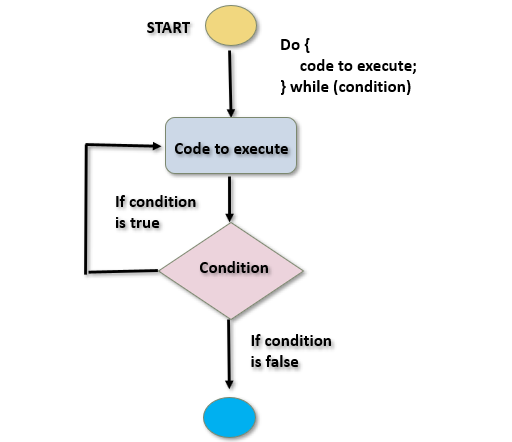
- Do while loop – first, it will execute the code, then check the condition and end when the condition is false.
Syntax :
do {
//code ; }
while(condition);
9. Switch Case
The switch case is a part of a conditional statement.
Syntax :
| Switch (expression) { Case 1 : Block of code Break; Case 2; Block of code Break; … Case n: Block of code Break; Default : Default block of code } |
These are the basic knowledge you should have before digging in the depth of the JavaScript programming language.
Tips
Here are some mandatory tips you should know :
Good luck!
0 responses on "Javascript for Beginners: an Ultimate Guide for You"